A Beginner's Guide to Electronics and Programming -I
What is Arduino and How Do I Get Started?
Have you ever wanted to dive into the world of electronics and create your own gadgets? Arduino is your perfect entry point! This microcontroller board makes it incredibly easy to program and build a variety of electronic projects, from simple blinking LEDs to advanced robots connected to the internet. Let’s explore what Arduino is all about and how you can get started with your own projects.
What is Arduino Used For?
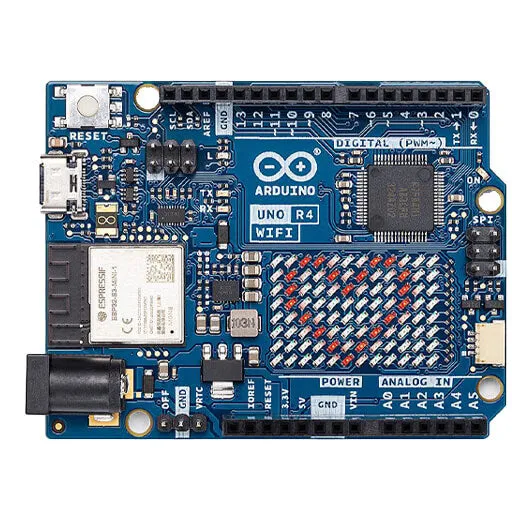
Imagine a small board that can control electronic devices with just a few lines of code. That’s Arduino for you! It features a microcontroller with several input and output pins, which you can program to interact with various components like LEDs, sensors, and motors. Whether you want to build a simple project like a remote control or a complex system like a radar, Arduino makes it accessible and fun.
The magic of Arduino lies in its simplicity and versatility. You can write code to control the pins, for example, setting an output to HIGH or LOW to turn an LED on or off. This means you can make things happen in the real world using just a bit of code!
Arduino
Getting Started with Arduino
Ready to get your hands dirty? Here’s what you need to start your journey with Arduino:
- Arduino Board: The Arduino UNO is a great choice for beginners.
- USB Cable: To connect your Arduino to your computer.
- Arduino IDE: The software where you write and upload your code.
Step-by-Step Guide
Install the Arduino IDE: Download and install the Arduino IDE from the official Arduino website.
Connect Your Board: Plug your Arduino board into your computer using the USB cable.
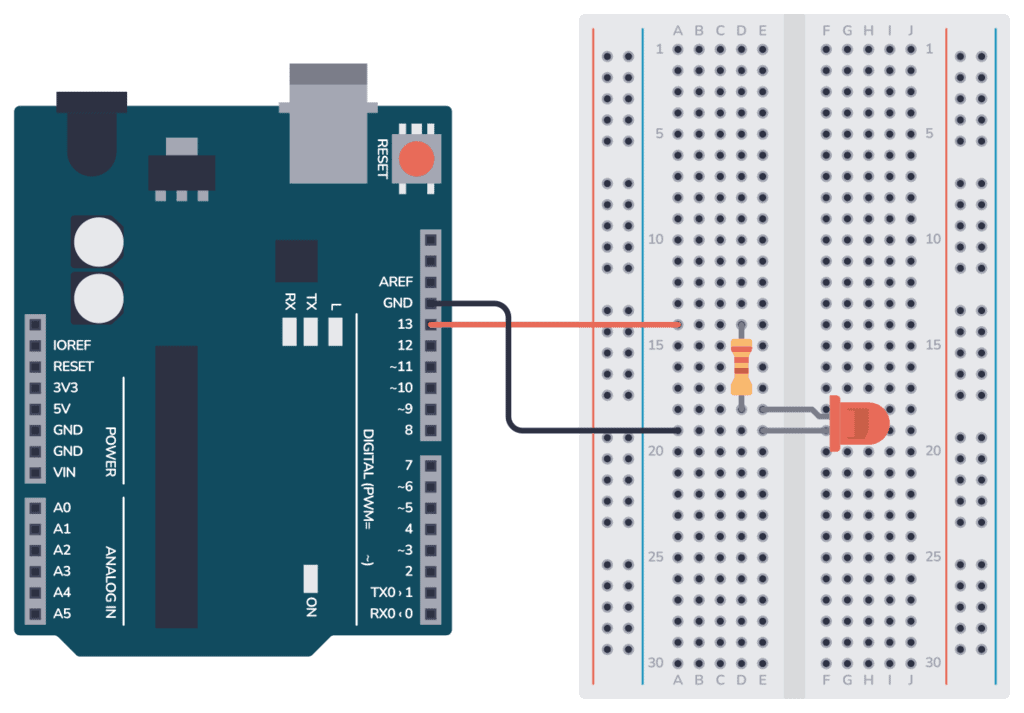
Write Your First Sketch: Open the Arduino IDE and start a new project. Here’s a simple code to blink an LED:
 1
 2
 3
 4
 5
 6
 7
 8
 9
10
void setup() { pinMode(13, OUTPUT); // Initialize digital pin 13 as an output } void loop() { digitalWrite(13, HIGH); // Turn the LED on delay(1000); // Wait for a second digitalWrite(13, LOW); // Turn the LED off delay(1000); // Wait for a second }
Arduino
- Upload Your Sketch: Click the upload button in the IDE to send the code to your Arduino board.
- Watch the Magic: Your LED should start blinking. Congrats, you’ve just built your first Arduino project!
Exploring Arduino Projects
With Arduino, you’re only limited by your imagination. Here are some project ideas to get you inspired:
- Blinking LEDs: Start simple by making patterns with LEDs.
- Temperature Sensor: Use a sensor to monitor the temperature and display it on an LCD.
- Remote Control: Build a remote control for your TV or other devices.
- Robot: Create a robot that can navigate its environment or follow a line.
- Home Automation: Control your lights and appliances with Arduino and sensors.
Understanding Arduino Code
Arduino code is written in C++ and consists of two main functions:
- setup(): Runs once when you power on the Arduino. Use it to initialize settings.
- loop(): Runs repeatedly after setup(). This is where you put the main code for your project.
For example, to control an LED, you use the digitalWrite() function to set the pin HIGH or LOW, and delay() to wait for a specified time.
Choosing the Right Arduino Board
There are many Arduino boards, each suited for different projects. Here are some popular ones:
- Arduino UNO: The classic choice for beginners with 14 digital I/O pins and 6 analog inputs.
- Arduino Leonardo: Similar to the UNO but with built-in USB communication, great for emulating peripherals like keyboards.
- Arduino Micro: A smaller version of the Leonardo, perfect for compact projects.
- Arduino Nano: A mini version of the UNO, designed to fit on a breadboard.
- Arduino Mega: For complex projects requiring more I/O pins and memory.
Join the Arduino Community
One of the best parts about Arduino is the vibrant community. You can find countless tutorials, forums, and projects shared by enthusiasts worldwide. Whether you need help troubleshooting or want to show off your latest creation, the Arduino community is there to support you.
Conclusion
Arduino opens up a world of possibilities for anyone interested in electronics and programming. Its ease of use and the supportive community make it an excellent tool for both beginners and experienced makers. So, what are you waiting for? Grab an Arduino, start coding, and bring your electronic dreams to life!
Happy tinkering!